amazon
Optimiseur de fiche produit
Réécrit votre titre, vos puces, votre description et vos mots-clés backend à partir de données concurrents et mots-clés en direct.
35crédits / exécution · dès $1.75
Connectez-vous pour lancer cet outil.
ConnexionWhat the Listing Optimizer does
Give it an ASIN and a marketplace, and it rebuilds the listing from evidence: it fetches your live listing data, analyzes up to 12 competing products in the same price bracket, looks up real monthly search volumes for the keywords that matter, and writes the full listing — title, Item Highlights, five bullets, description, and backend search terms — to Amazon's current content rules, including the 75-character title limit Amazon begins enforcing July 27, 2026.
Every claim on the results page is backed by data you can inspect: which keywords were used and where, what they're searched for monthly, how your listing scored before and after, and which competitor listings were analyzed.
What you get
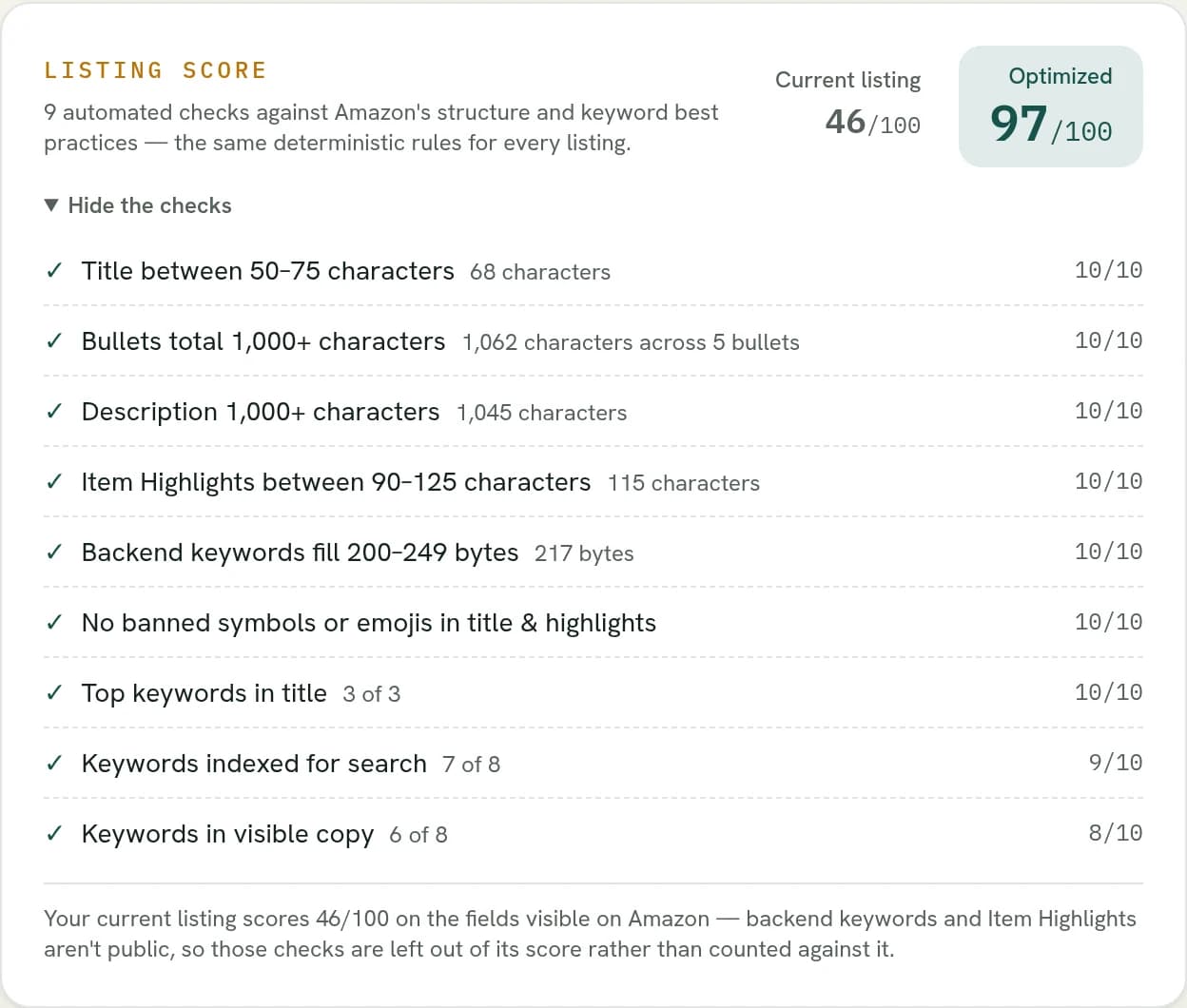
✓ Before-and-after listing score
Your current listing and the optimized version are both scored 0–100 on structure and keyword coverage, check by check — so you can see exactly what improved and what your current listing is being penalized for.
✓ 12-competitor analysis
The optimizer analyzes up to twelve competing listings in your price bracket (your own brand excluded) and shows you every one it used.
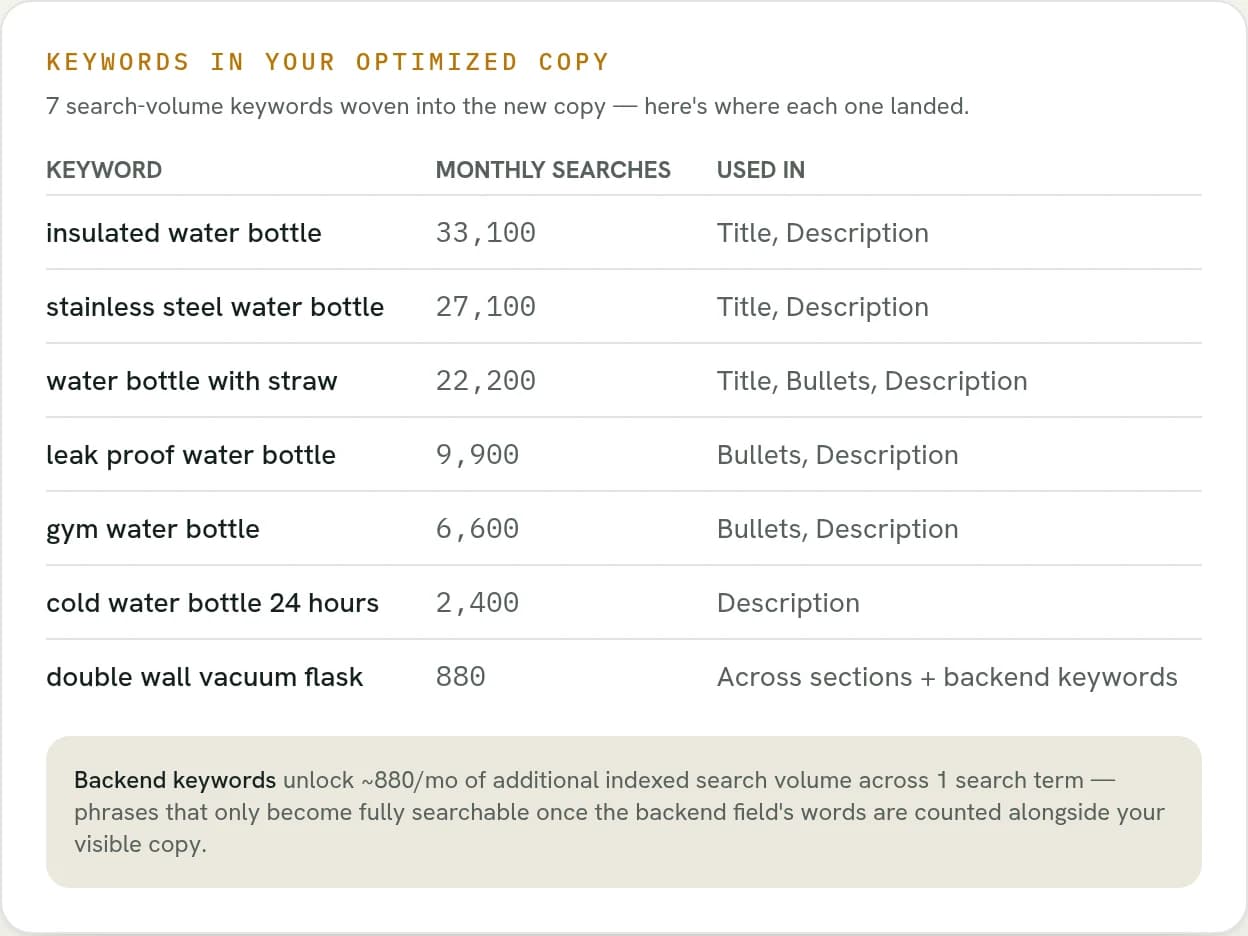
✓ Real keyword search volumes
Keywords come with monthly search volumes from live Amazon data — and the table separates keywords used in your copy from additional researched opportunities.
✓ Backend search terms that add reach
The hidden search-term field is written to Amazon's rules — unique words, per-marketplace byte budgets — and the results page shows how much additional indexed search volume it unlocks.
✓ Push to Amazon
Connect your Seller account and publish the approved update straight to your live listing through the Amazon Selling Partner API — after you've reviewed it. Amazon's validation response is shown right on the run page.
✓ Copy buttons and Excel export
Every field has its own copy button, and the whole run exports to an .xlsx workbook with character and byte counts plus a keywords tab.
13 marketplaces, 12 output languages
Run against any of 13 Amazon marketplaces, from amazon.com to amazon.co.jp. The copy can be written in the marketplace's own language or any of 12 supported output languages — Polish copy for amazon.de, Arabic for amazon.ae. Marketplace-specific rules like backend-keyword byte limits apply automatically.
Frequently asked questions
How much does a run cost?
The credit price is shown on the run button before you commit — no subscription. Failed runs are refunded automatically.
Do I need to connect my Amazon account?
No — a run only needs an ASIN. Connecting is only required if you want to push the result to your listing afterwards, or use the free Catalog Analyzer.
Will it change my live listing?
Not by itself. A run only generates content. Your listing changes only if you press Push to Amazon after reviewing the result — or paste the copy into Seller Central yourself.
What about A+ descriptions?
If your description is built from A+ images, the optimizer detects that and says so instead of treating it as missing text — and scoring excludes what can't be known.
What if my product isn't on Amazon yet?
That's the Listing Creator — it builds a complete listing draft from your product details, no ASIN needed.